
Winnie the Pooh in the Hundred Acre Wood
aka Winnie the Pooh
Rate this game
- Played
- Rarely
Winnie the Pooh in the Hundred Acre Wood turns A.A. Milne's world into a peaceful grid of point-to-point errands, where the biggest danger is a cheerful bounce from Tigger that knocks your current item into the grass.
Sierra's attempt to make an adventure game without the death screens
By 1985, adventure games were notorious for punishing players. Sierra On-Line had already made a name for itself with titles that would kill your character for stepping off a ledge or typing the wrong command, but the team wanted to build something accessible for kids who loved Disney. Al Lowe took on the design and programming, turning to artist Mark Crowe and a small team to translate the classic cartoon look onto home computers using early pre-AGI tech.
Sierra On-Line dropped the usual text parser in favor of clean directional inputs. Instead of wrestling with a dictionary, you moved through the forest screen by screen using simple commands. Period reviews like the one in COMPUTE! magazine praised it as a proper adventure for children that avoided making things too easy or painfully hard, while Your Commodore called it a risk-free learning ground for beginners. There were no bottomless pits, no starvation timers, and no monsters hiding in the trees.
How Winnie the Pooh in the Hundred Acre Wood works on screen
The goal is simple: a fierce wind has blown through the forest, scattering ten personal possessions across the map. You step into the woods to find each object and return it to its rightful owner. The catch is your inventory capacity. You can carry exactly one item at a time, meaning every pickup forces a choice. If you pick up Piglet's green balloon while carrying Eeyore's tail, you leave the tail right where you are standing until you walk back for it.
The items map directly to character quirks. You spend your time matching things like Owl's lantern and books, Rabbit's turnips and shovel, Christopher Robin's crayons, Kanga's broom, or Roo's mittens. Some screens hide small interactive touches, like climbing Pooh's tree to check on his saved honey pots, matching the scene straight out of the books and animated films. If you get stuck trying to remember who owns what, Owl sits on his perch ready to offer hints.
Where the grid navigation falls down
While the game skips text parser headaches, its navigation menu introduces its own brand of friction. The prompt screen offers North, East, South, and West options on every single screen, regardless of whether a path exists. Selecting a blocked direction sends you bumping into invisible walls, triggering confusing messages or accidentally shoving your character into a house or a hole. Retro reviewers on sites like DOSGames have pointed out how easy it is to lose your orientation when the interface claims you can go South into a solid hedge.
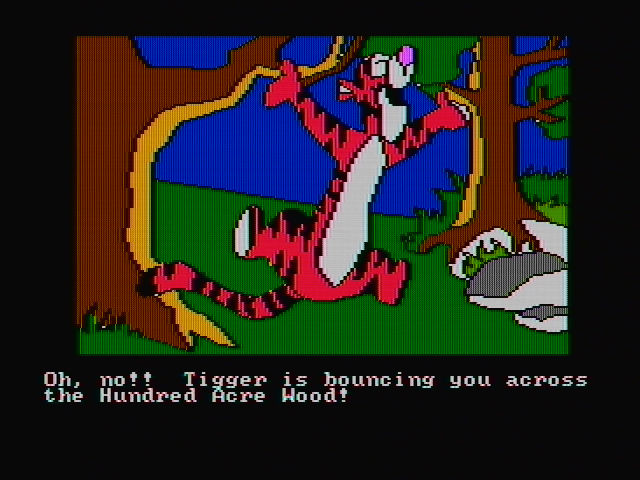
The other source of chaos is Tigger. He roams the forest screens as the game's sole dynamic hazard. If he bounces into your screen, he knocks away whatever item you are carrying, forcing you to track it down again. Combined with periodic gusts of wind that reshuffle uncollected items across the map, a simple delivery run can quickly turn into a multi-screen wild goose chase.
- Single-item inventory: You must plan your routes across the grid, as dropping an item leaves it vulnerable to wind resets.
- Tigger's bounces: Stepping onto a screen with Tigger means instantly losing the item currently in your hands.
- Randomized starts: Item locations change with every new game, though character houses remain fixed.
Static art, simple beeps, and early PC history
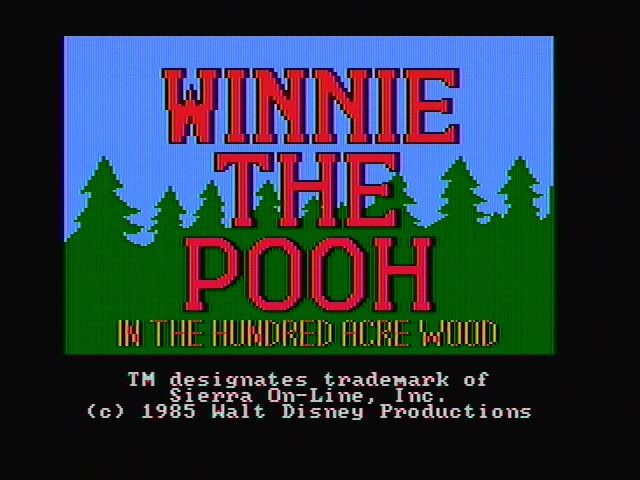
Unlike Sierra's later third-person Quest games, this title uses static scenes without real-time character animation. You explore the world by stepping from card to card like a digital picture book. The MS-DOS version relies entirely on the internal PC speaker for audio, delivering simple, sharp beeps whenever you complete a delivery or trigger an action. Early release copies even suffered from minor logic bugs, like Eeyore occasionally refusing to take his balloon, which community source projects like ScummVM eventually patched out years later.
As an early entry in the adventure games genre, it sits alongside Sierra's 1985 lineup from their 1985 release list. It stripped away the lethal traps of mainstream adventures to build something gentle, establishing design patterns that Al Lowe and Mark Crowe would take toward very different projects later in the decade.
Try Winnie the Pooh in the Hundred Acre Wood free in your browser
Sierra simplified their AGI parser for younger players here, making the whole thing mouse-driven before standard Sierra adventures dropped the text box. The navigation interface requires a bit of patience when a fence post blocks your turn North, but the short loop of tracking down lost honey pots and umbrellas stays rewarding.
You can play Winnie the Pooh in the Hundred Acre Wood online right now. The full Winnie the Pooh in the Hundred Acre Wood MS-DOS game loads straight in your browser with no setup needed, so you can test your memory against Tigger's sudden appearances and return Eeyore's missing tail in a quick afternoon session.
How Winnie the Pooh in the Hundred Acre Wood is played — the keys the game listens to, grouped by what they do.
- Movement
Highlighted keys are mapped — hover or tap one to see what it does.
Players' controls
Touch and gamepad controls
The on-screen keyboard and gamepad mapping the browser player uses on a phone, a tablet or a controller, as opposed to the real keys above. $PRO members make their own in the player and share them here; anyone can pick one to play with.
Make your own touch controlsPRO
- 1Open the editorSign in below, then pick what to make. The game starts with the editor open over it.
- 2Place your keysAdd keys and drag them where your thumbs rest, or map a controller's buttons. Test plays the game with them; Save keeps them, and you play with them from then on.
- 3Share themShare them right after saving in the game, or name and share them here. Players vote, and the best become this game's controls for everyone.
Go PROSee how it worksSign in+20 XP for sharing · +50 XP if yours become the game's own
- The game's own controlsKeyboardGamepadWhat every player starts with.In use
2 screenshots
From the archive
No gameplay video yet
No gameplay video for Winnie the Pooh in the Hundred Acre Wood yet. Sign in to add one.
No reviews yet
Tell the community what you think of Winnie the Pooh in the Hundred Acre Wood. Reviews are public and tied to your username.
No archived manuals for Winnie the Pooh in the Hundred Acre Wood yet
No manuals archived for this title yet. Sign in to upload the first scan.
Cheat codes, console commands and memory pokes for Winnie the Pooh in the Hundred Acre Wood — each one verified and attributed.
Sign in to submitNo cheats yet for this title
Know a working cheat, poke or trainer? Add it with the button above. Moderators check every entry before it goes live.
No archived soundtrack for Winnie the Pooh in the Hundred Acre Wood yet
No soundtrack archived for this title yet. Sign in to upload the first rip.
No save states for Winnie the Pooh in the Hundred Acre Wood yet
No save states for this title yet. Sign in to share one.
Discussions
Sign in to post- Threads0
- Total posts0
- Online now6
Community · Winnie the Pooh in the Hundred Acre Wood
Who's contributing, and what's new
- Reviews0
- Threads0
- Uploadsapproved0
- Contributors0
Recent activity
Nothing here yet
Reviews, discussion threads and approved uploads appear here as members add them.