

Follow the Reader
aka Disney's Follow the Reader · Mickey Mouse - Follow the Reader
Rate this game
- Played
- Rarely
In Follow the Reader, you build sentences from lists of words at the bottom of the screen to guide Mickey Mouse through a full day of eating, playing, and heading to bed. It plays more like an animated story constructor than a traditional adventure game, letting young players assemble actions and watch Mickey react on screen.
Building Mickey's schedule one verb at a time
When you start a session in this 1992 educational game, you are staring at Mickey Mouse in his room with a text interface sitting along the bottom of the screen. Instead of typing commands into a parser or hunting for invisible pixels to click, you assemble sentences by picking subjects and predicates from lists. Selecting Mickey and pairing him with an action like cooking breakfast sends the famous mouse straight to the kitchen.
The pacing rests on simple sequences rather than strict hazards or ticking clocks. Cooking breakfast requires choosing kitchen actions in a sensible order so Mickey actually gets to eat rather than staring at cold ingredients. Once morning chores wrap up, you can take Mickey out of the house to visit the local park or head down to the beach.
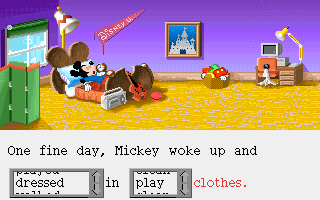
Outside of preparing meals, you spend your time directing Mickey to plant and water seeds in the garden, write letters at his desk, or practice playing musical instruments. You can order a pizza, turn on the television to catch a broadcast, or spend a few minutes taking care of basic hygiene before moving to the next room. If Pluto is wandering around, you can grab a bag of food and make sure the dog gets fed before you head out the door.
Follow the Reader lets you direct movies but restricts your phone book
What caught kids' attention back then was the ability to record an entire daily routine and play it back from start to finish. Once you queue up a full day of events leading to Mickey getting into bed, you can save your constructed tale and run it automatically without clicking another button. The entire sequence rolls like a short animated film using official voice actors for the characters, which sounded clean on a Sound Blaster card or a machine equipped with Tandy Music hardware.
That presentation explains why an IBM Aptiva computer in the mid-1990s often shipped with a self-running demo of the title pre-installed on the hard drive. Showing off animated Disney characters speaking with their actual cartoon voices was a quick way to convince families that a home PC was worth buying. Even on systems limited to Tandy Graphics, the character animation kept the screen active while kids experimented with different word combinations.

The system shows its limits as soon as you try to socialize over the phone. While you can arrange picnics outdoors with Donald or Minnie, the house telephone restricts your options considerably. The phone menu only lets you call Goofy, which leaves Mickey looking odd whenever you want to ring up anyone else in town.
Text choices keep the pace simple for early readers
Developed by Disney Software and published by Walt Disney Computer Software, Inc., the project targeted early readers who were not ready for complex typing interfaces. Among the pool of PC games from 1992, this approach offered a calm structure free from hidden traps, game-over screens, or inventory management puzzles. You never lose a life or get stuck in an unwinnable state because the text menus only display valid actions for the current room.
That structured simplicity means older players will exhaust the available activities quickly. There are no secret areas to discover, no alternate paths hiding behind locked doors, and no branching side quests to unlock. The entire loop is designed around reading practice, meaning its value depends entirely on whether a young player wants to hear Mickey react to every sentence option on the board.
If you put the Follow the Reader MS-DOS game next to other mouse-driven titles of the early nineties, its focus is clear and narrow. It acts as a digital picture book where sentence construction replaces direct joystick control. For anyone outside its target age group, half an hour is more than enough time to see every room and trigger every available animation.
Jump back into Mickey's day right inside your web browser
While it will not challenge an adult player looking for a deep mystery, it is a clean experiment in early literacy software. The pixel art holds up nicely, the voice clips give basic sentences plenty of character, and watching Mickey follow your precise text instructions is still fun to watch. It works best as a light sandbox for young kids learning how verbs build actions.
You can play Follow the Reader online and test every sentence menu yourself without worrying about vintage hardware setups. You can launch Follow the Reader free in your browser right below this text, assemble a full morning schedule for Mickey Mouse, and test whether he actually cooks breakfast before heading out to feed Pluto.
How Follow the Reader is played — the keys the game listens to, grouped by what they do.
- Interface
- Left click — Select words and interface items
Highlighted keys are mapped — hover or tap one to see what it does.
Key mapping details are limited due to a lack of complete original manual scans.
Players' controls
Touch and gamepad controls
The on-screen keyboard and gamepad mapping the browser player uses on a phone, a tablet or a controller, as opposed to the real keys above. $PRO members make their own in the player and share them here; anyone can pick one to play with.
Make your own touch controlsPRO
- 1Open the editorSign in below, then pick what to make. The game starts with the editor open over it.
- 2Place your keysAdd keys and drag them where your thumbs rest, or map a controller's buttons. Test plays the game with them; Save keeps them, and you play with them from then on.
- 3Share themShare them right after saving in the game, or name and share them here. Players vote, and the best become this game's controls for everyone.
Go PROSee how it worksSign in+20 XP for sharing · +50 XP if yours become the game's own
- The game's own controlsKeyboardGamepadWhat every player starts with.In use
2 screenshots
From the archive
No gameplay video yet
No gameplay video for Follow the Reader yet. Sign in to add one.
No reviews yet
Tell the community what you think of Follow the Reader. Reviews are public and tied to your username.
No archived manuals for Follow the Reader yet
No manuals archived for this title yet. Sign in to upload the first scan.
Cheat codes, console commands and memory pokes for Follow the Reader — each one verified and attributed.
Sign in to submitNo cheats yet for this title
Know a working cheat, poke or trainer? Add it with the button above. Moderators check every entry before it goes live.
No archived soundtrack for Follow the Reader yet
No soundtrack archived for this title yet. Sign in to upload the first rip.
No save states for Follow the Reader yet
No save states for this title yet. Sign in to share one.
Discussions
Sign in to post- Threads0
- Total posts0
- Online now6
Community · Follow the Reader
Who's contributing, and what's new
- Reviews0
- Threads0
- Uploadsapproved0
- Contributors0
Recent activity
Nothing here yet
Reviews, discussion threads and approved uploads appear here as members add them.