In 1991, Falcon 3.0 set the standard for hardcore flight simulators by treating flight dynamics like a serious math problem rather than a casual arcade game.
The moment you step into the cockpit of the F-16 Fighting Falcon, the sim stops holding your hand. Pulling back hard on the stick does not auto-correct your angle, and over-cooking a turn will bleed off speed until your aircraft stalls into an aggressive flat spin. If your computer was equipped with an optional math coprocessor, the game activated a high-fidelity flight dynamics mode that calculated real-time physical forces across the jet frame, making early 1990s simulation games feel like glorified toy sets by comparison.
Getting behind a MiG-21 took actual energy management, not just pulling back on the stick. An AIM-9M heat-seeker needed a clean rear aspect, which meant watching your altitude, throttle, and g-forces every second of the turn. Players relied on the padlock view to track bandits overhead while turning hard, sticking your eyes to the enemy regardless of where the nose pointed. Trying to juggle all of that on a basic two-button joystick usually meant stalling out and pancaking your F-16 straight into the dirt.
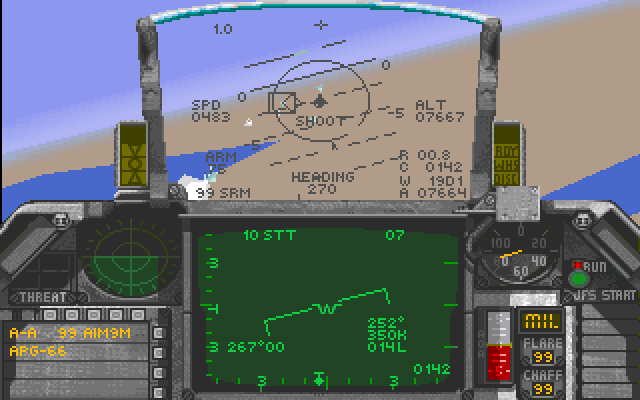
Developer Sphere, Inc. and publisher Spectrum HoloByte, Inc. built three full operational theaters: Panama, Israel, and Iraq, alongside a Red Flag training range in Nevada. Rather than giving you fixed mission scripts, the campaign engine tracked limited supplies of pilots, airframes, and ordnance over time. If you lost four aircraft and exhausted your supply of air-to-ground missiles on day one, those resources were gone until a supply drop arrived. You had to plan every sortie down to weapon loadouts, target prioritization, and taking out enemy ground missile sites to clear paths for friendly bombers.
The trade-off for this depth was a crushing hardware requirement. To run this 1991 release smoothly, your PC needed a 386 processor or better, and configuring the mandatory 600K of free conventional memory was a rite of passage for DOS users. If your system was underpowered, the framerate dropped into single digits during low-altitude strikes over dense target arrays. The package came with a thick 250-page manual that was less of an instruction booklet and more of an entry-level flight school text, which you actually had to study to understand radar modes and landing approaches.
If you wanted to test your combat skills against real people, the networking options were surprisingly complete. Up to eight players could fly together over a Novell IPX network, or you could set up a head-to-head match using a null-modem cable or direct dial-up. Dogfighting a human pilot exposed every flaw in your tactical awareness, particularly when someone tried to drag you down low into their own anti-aircraft missile envelope.
After a engagement, you did not have to guess what went wrong. The game featured an Air Combat Maneuvering Instrumentation (ACMI) tape feature, which recorded your entire flight in three-dimensional space. The ACMI recorder let you replay engagement geometry from any camera angle, rewinding to the exact second an enemy missile cleared your wing so you could analyze your mistakes.
The learning curve is steep and landing without wiping out your gear takes real work, but the flight physics still hold up. You can read about its development history, but the best way to get a feel for the avionics and weapons is to jump straight into the cockpit.
You can experience this classic Falcon 3.0 MS-DOS game directly in your browser without worrying about configuring base memory or tweaking system files. If you want to play Falcon 3.0 online, it launches right here in a single click. Start with the Red Flag training missions, keep an eye on your airspeed indicator during turns, and remember to check the padlocked enemy target before firing your sidewinders.
In 1991, Falcon 3.0 set the standard for hardcore flight simulators by treating flight dynamics like a serious math problem rather than a casual arcade game.
The moment you step into the cockpit of the F-16 Fighting Falcon, the sim stops holding your hand. Pulling back hard on the stick does not auto-correct your angle, and over-cooking a turn will bleed off speed until your aircraft stalls into an aggressive flat spin. If your computer was equipped with an optional math coprocessor, the game activated a high-fidelity flight dynamics mode that calculated real-time physical forces across the jet frame, making early 1990s simulation games feel like glorified toy sets by comparison.
Getting behind a MiG-21 took actual energy management, not just pulling back on the stick. An AIM-9M heat-seeker needed a clean rear aspect, which meant watching your altitude, throttle, and g-forces every second of the turn. Players relied on the padlock view to track bandits overhead while turning hard, sticking your eyes to the enemy regardless of where the nose pointed. Trying to juggle all of that on a basic two-button joystick usually meant stalling out and pancaking your F-16 straight into the dirt.

Developer Sphere, Inc. and publisher Spectrum HoloByte, Inc. built three full operational theaters: Panama, Israel, and Iraq, alongside a Red Flag training range in Nevada. Rather than giving you fixed mission scripts, the campaign engine tracked limited supplies of pilots, airframes, and ordnance over time. If you lost four aircraft and exhausted your supply of air-to-ground missiles on day one, those resources were gone until a supply drop arrived. You had to plan every sortie down to weapon loadouts, target prioritization, and taking out enemy ground missile sites to clear paths for friendly bombers.
The trade-off for this depth was a crushing hardware requirement. To run this 1991 release smoothly, your PC needed a 386 processor or better, and configuring the mandatory 600K of free conventional memory was a rite of passage for DOS users. If your system was underpowered, the framerate dropped into single digits during low-altitude strikes over dense target arrays. The package came with a thick 250-page manual that was less of an instruction booklet and more of an entry-level flight school text, which you actually had to study to understand radar modes and landing approaches.

If you wanted to test your combat skills against real people, the networking options were surprisingly complete. Up to eight players could fly together over a Novell IPX network, or you could set up a head-to-head match using a null-modem cable or direct dial-up. Dogfighting a human pilot exposed every flaw in your tactical awareness, particularly when someone tried to drag you down low into their own anti-aircraft missile envelope.
After a engagement, you did not have to guess what went wrong. The game featured an Air Combat Maneuvering Instrumentation (ACMI) tape feature, which recorded your entire flight in three-dimensional space. The ACMI recorder let you replay engagement geometry from any camera angle, rewinding to the exact second an enemy missile cleared your wing so you could analyze your mistakes.
The learning curve is steep and landing without wiping out your gear takes real work, but the flight physics still hold up. You can read about its development history, but the best way to get a feel for the avionics and weapons is to jump straight into the cockpit.
You can experience this classic Falcon 3.0 MS-DOS game directly in your browser without worrying about configuring base memory or tweaking system files. If you want to play Falcon 3.0 online, it launches right here in a single click. Start with the Red Flag training missions, keep an eye on your airspeed indicator during turns, and remember to check the padlocked enemy target before firing your sidewinders.
How Falcon 3.0 is played — the keys the game listens to, grouped by what they do.
Highlighted keys are mapped — hover or tap one to see what it does.
Eject requires pressing Ctrl+E three times in succession. Joystick throttle calibration can be set in the menu bar.
The on-screen keyboard and gamepad mapping the browser player uses on a phone, a tablet or a controller, as opposed to the real keys above. $PRO members make their own in the player and share them here; anyone can pick one to play with.
Cheat codes, console commands and memory pokes for Falcon 3.0 — each one verified and attributed.
Sign in to submitaka Electronic Battlefield Series : Falcon 3.0
How Falcon 3.0 is played — the keys the game listens to, grouped by what they do.
Highlighted keys are mapped — hover or tap one to see what it does.
Eject requires pressing Ctrl+E three times in succession. Joystick throttle calibration can be set in the menu bar.
The on-screen keyboard and gamepad mapping the browser player uses on a phone, a tablet or a controller, as opposed to the real keys above. $PRO members make their own in the player and share them here; anyone can pick one to play with.
Cheat codes, console commands and memory pokes for Falcon 3.0 — each one verified and attributed.
Sign in to submit